A simple to-do list that lives on a calendar
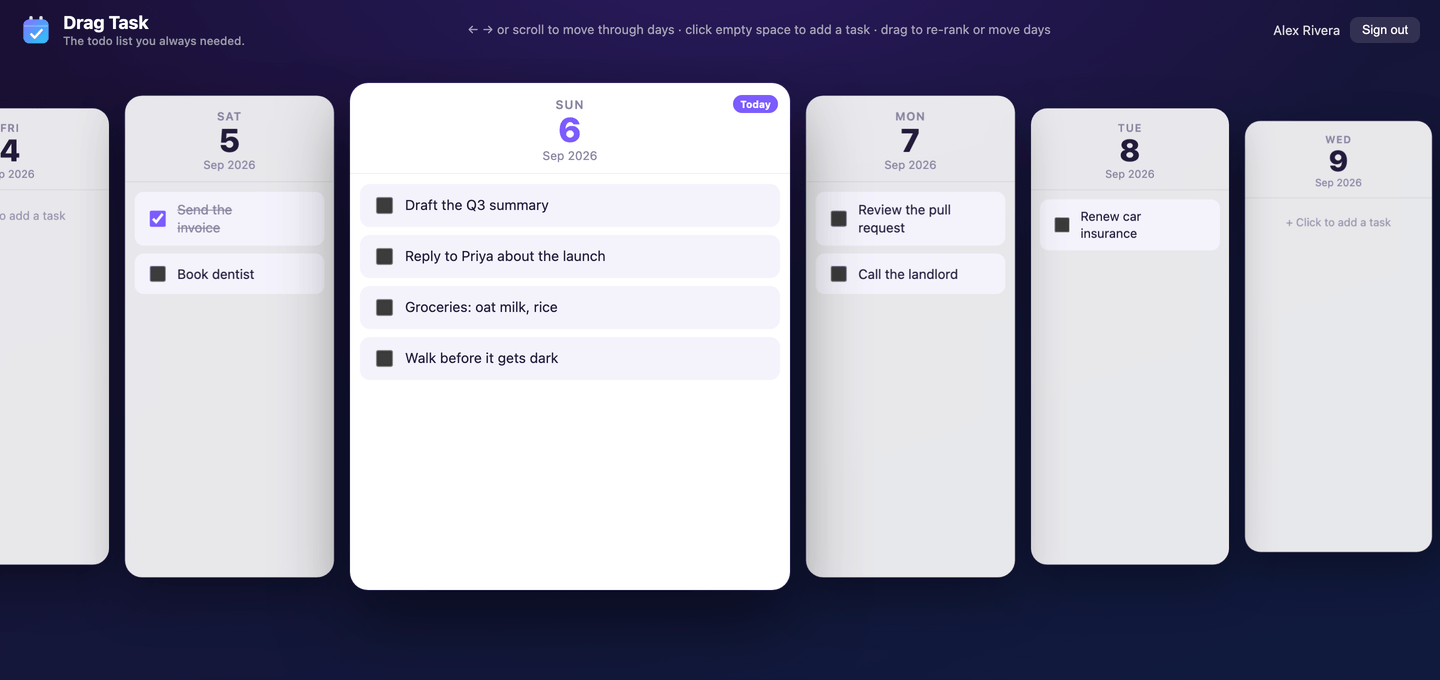
Drag Task lays your to-dos out as a calendar of days: click any day to add a task, drag a task onto another date to move it. It is the same list on your laptop and your phone — free, in your browser, with nothing to install.
Free forever · Same list on phone and desktop · Nothing to install · No ads
How it works
Open it in your browser
Nothing to install and no app store. Open the page on a laptop or a phone and Drag Task lands on today, magnified in the middle of your calendar.
Click a day and type
Click the empty space under any day to drop in a task. Press Enter and it's saved — and already on your other devices.
Drag it forward
Didn't get to it? Drag the task onto tomorrow — or next Friday — and it's rescheduled.
What it does
Your to-do list is the calendar
Every task sits on the day you mean to do it. There is no separate calendar view to switch to and no due-date field to fill in — the list and the calendar are the same screen.
Drag a task to another day
Didn't get to it? Grab it and drop it on tomorrow, or next Friday. Rescheduling is one gesture — no date picker, no menus, no dialog.
One list, phone and laptop
Sign in with Google and the same calendar follows you. Add a task on your laptop and it is on your phone before you pick it up — no export, no second app to keep in step.
Scroll through your days
Days sit side by side in a coverflow with today magnified in the middle. Arrow keys, a scroll wheel or a swipe move you through the week.
Click empty space to add
No modal, no + button to hunt for. Click the gap under a day's tasks and start typing. Drag tasks up and down to re-rank them within a day.
Simple on purpose
Days, tasks, dragging. No projects, labels, priorities, subtasks or streaks to maintain — and no Pro tier, no trial timer, no ads.
What it deliberately doesn't do
Simple is the feature, so a lot is missing on purpose. Drag Task has no:
- Projects, labels, priorities and subtasks
- Reminders and notifications
- Meetings, events, or Google Calendar import
- Team sharing and assigning work to other people
- A paid tier, ads, and advertising trackers
If you want those, Todoist and TickTick do them well. If you have bounced off apps like that because maintaining the system became the work, this is the other end of the scale: days, tasks, and dragging.
Questions
Is Drag Task a to-do list or a calendar?
Both — they are the same screen. Drag Task is a to-do list laid out as a calendar: each day is a column, and the tasks you plan to do that day sit inside it. You never switch between a list view and a calendar view, because there is only one view.
How do I move a to-do to another day?
Pick the task up and drop it on the day you want. Drag Task is built around that one gesture — dragging a task onto a different date is how you reschedule it, so there is no due-date field to open and no menu to dig through.
Do I need to download an app?
No. Drag Task runs in the browser on any laptop, tablet or phone — there is nothing to install and no app store involved. You can also add it to your home screen so it opens like an app if you prefer.
Can I use the same to-do list on my phone and my computer?
Yes, and it is the same single list on both. Sign in with your Google account on each device and your tasks sync live, so a task you add on your laptop appears on your phone straight away and a task you tick off on your phone is already done when you open your laptop.
Is Drag Task free?
Yes, completely. There is no paid tier, no trial timer, no feature locked behind an upgrade and no ads.
Do I have to create an account?
Only if you want your tasks saved. You can try the full app in the live demo without signing in at all. To keep your tasks and sync them between devices, sign in with your existing Google account — there is no separate password to make.
Does it work on a phone?
Yes. On a small screen the calendar becomes one full-width day at a time that you swipe between, and tasks still drag to re-rank. It is the same list and the same data as the desktop view.
Can I see my Google Calendar events in Drag Task?
No. Drag Task shows your tasks only — it does not import meetings or events from Google Calendar or any other calendar. It is a to-do list drawn on a calendar grid, not a replacement for the calendar your meetings live in.
Can I share a list with someone else?
No. Drag Task is a personal planner: your list syncs across your own devices, but there is no team sharing, no collaborators and no assigning tasks to other people.
How is this different from Todoist or Google Tasks?
Most to-do apps treat the date as a property you edit inside a task. Drag Task treats the calendar as the list itself: every day is a column you can see, and moving work to another day is a drag rather than a form. It is also deliberately much smaller — no projects, labels, priorities or reminders to maintain. If setting up the system is the part that makes you quit to-do apps, that is the trade this one makes.
How it compares
Drag Task is much smaller than most to-do apps. These say plainly where it loses, so you can decide before signing into anything.
Drag Task vs Tweek
Choose Drag Task if you want a to-do list on a calendar with no paid tier to run into, no install, and no setup — and you would rather scroll freely through weeks and months than see a fixed seven days.
Drag Task vs Todoist
Choose Drag Task if maintaining the system is precisely the part that made you stop using Todoist, and you want your tasks sitting on days with nothing else to manage.
Drag Task vs Google Tasks
Choose Drag Task if your calendar is too crowded with meetings to also be a to-do list, and you want a separate, task-only calendar where every day's work is visible without opening a panel.
Drag Task vs TeuxDeux
Choose Drag Task if you want the same basic day-first idea stripped back to one free browser screen, and moving a task to another date is the main interaction you care about.
Drag Task vs TickTick
Choose Drag Task if all that machinery is why your old to-do system stopped being useful, and you want one task-only calendar where rescheduling is simply a drag.
Start with today
Open the calendar, add what you owe today, and drag forward whatever you don't get to.